owncast
Take control over your live stream video by running it yourself. Streaming + chat out of the box.
⭐ 11,222 stars on GitHub · 🍴 1,192 forks · 📜 License: mit · 💻 Language: Go
What is owncast?
Self-hosted live streaming usually means stitching together media servers, chat, web UI, and moderation tools. Owncast packages the core Twitch-style experience into a single Go service you can run yourself, with RTMP ingest and live chat ready out of the box.
Main components
- RTMP-compatible live video server for broadcasting from OBS, Streamlabs, Restream, and similar tools.
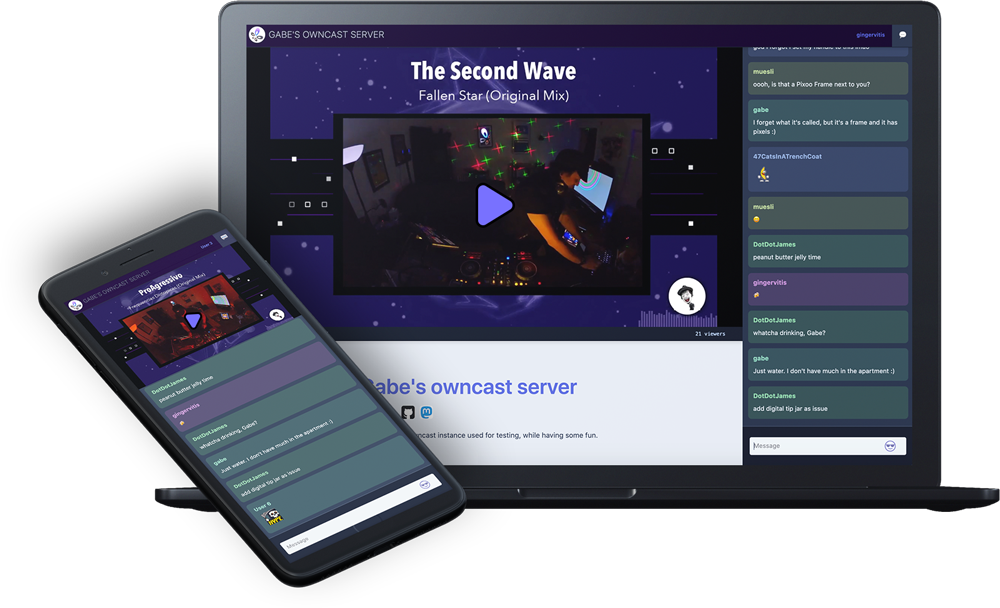
- Built-in web player and chat interface for viewers.
- Admin interface for configuring stream settings, appearance, and moderation.
- Single-user streaming model focused on one channel rather than a multi-tenant platform.
- Fediverse and ActivityPub support for decentralized discovery and audience interaction.
- Go backend with React frontend, using ffmpeg for video processing.
Clear use cases
- Run an independent live stream without sending viewers to Twitch, YouTube, or Facebook.
- Host a community radio, video show, podcast recording, or live coding session under your own domain.
- Give a creator, nonprofit, school, or local group a branded streaming page with integrated chat.
- Keep ownership of stream presentation, moderation rules, viewer experience, and data.
- Build a Fediverse-friendly streaming presence that can connect with decentralized social audiences.
The biggest strength is control without building a streaming stack from scratch — Owncast gives you the parts most solo streamers actually need: ingest, playback, chat, admin, customization, and basic federation in one deployable service. Compared with commercial platforms, the tradeoff is that you manage hosting, bandwidth, scaling, and reliability yourself; the payoff is no platform lock-in, no algorithmic feed dependency, and no forced branding around your content.
Owncast is not trying to be a full Twitch replacement for many creators on one shared platform. Its sweet spot is the single-channel broadcaster who wants a clean, self-owned destination and is comfortable running a server. You will still need to plan for upload capacity, viewer bandwidth, CDN strategy if your audience grows, and operational basics like TLS, backups, monitoring, and upgrades.
Best for independent creators, community media teams, educators, nonprofits, and technically comfortable streamers who want a self-hosted live channel with chat under their own control.
Topics: the project is tagged with popular topics:
- 🏷️
activitypub - 🏷️
broadcasting - 🏷️
chat - 🏷️
decentralized - 🏷️
federation - 🏷️
fediverse - 🏷️
golang - 🏷️
hacktoberfest - 🏷️
hls - 🏷️
live
📸 Screenshots



Quick install
See the README for detailed install instructions. Most projects support Docker — if the repo has a Dockerfile, use:
git clone https://github.com/owncast/owncast.git
cd owncast
docker build -t owncast .
docker run -d -p 8080:8080 owncast
Minimum system requirements
| Component | Recommended |
|---|---|
| RAM | 4096 MB |
| CPU | 2 vCPU |
| Disk | 50 GB SSD |
| OS | Ubuntu 22.04 LTS / Debian 12 |
| Docker | 24.0+ |
⚡ Deploy fast on VSIS
Use the VSIS VPS Standard 4GB RAM / 2 vCPU / 50GB SSD (~150k/tháng) plan from VSIS.NET — high-speed VN-based VPS, 24/7 support, ideal for running owncast smoothly.
🎯 Benefits:
- One-command
docker compose up -ddeploy in 2 minutes - Dedicated IPv4, root access, unmetered domestic bandwidth
- Daily snapshot backup
- Free install assistance from the VSIS team
👉 See matching VPS plans at vsis.net
Resources
- 🔗 GitHub: owncast/owncast
- 🌐 Homepage: https://owncast.online
- 📚 Official docs: see README in the repo
- 💬 Community: GitHub Issues + Discussions
Article compiled from GitHub data on 05/05/2026. Star/fork counts may have changed — see live numbers via the GitHub link.
