
CasaOS
CasaOS - A simple, easy-to-use, elegant open-source Personal Cloud system.
⭐ 33,766 stars on GitHub · 🍴 1,900 forks · 📜 License: apache-2.0 · 💻 Language: Go
What is CasaOS?
A polished personal cloud dashboard can make a home server feel less like a weekend sysadmin project and more like a usable appliance. CasaOS stands out by wrapping Docker-based self-hosting, storage management, and app discovery in a clean web UI aimed at non-specialist home users.
Main components
- Web-based home server dashboard for managing apps, files, storage, and system status from one place.
- Docker application management with a built-in app store for common self-hosted services.
- Simple file manager for browsing, uploading, downloading, and organizing data on your server.
- Storage views for disks and volumes, useful when turning spare hardware into a NAS-like box.
- Lightweight Go-based backend designed to run on low-power devices such as Raspberry Pi and mini PCs.
- Home-cloud focus, with an interface built around personal media, backups, IoT, and local services rather than enterprise orchestration.
Clear use cases
- Turn a Raspberry Pi, ZimaBoard, or old mini PC into a personal cloud with a browser-based control panel.
- Run popular self-hosted apps without hand-writing Docker Compose files for every service.
- Give family members a simple place to access files, media, and home services on the LAN.
- Build a low-cost home lab for experimenting with containers before moving to more advanced tooling.
- Consolidate personal storage, media apps, smart-home tools, and lightweight web services on one always-on machine.
CasaOS is not trying to replace Kubernetes, Proxmox, TrueNAS SCALE, or a full DevOps platform. Its value is that it removes a lot of the friction that stops normal users from adopting self-hosting: SSH sessions, YAML files, scattered dashboards, and unclear storage paths. You still get Docker under the hood, but the day-to-day experience is closer to installing apps on a NAS or consumer router.
The project is especially useful when you want “good enough” infrastructure with a strong user experience. The app store model makes it easy to deploy things like media servers, download tools, file sync apps, home automation services, or personal productivity tools. For experienced admins, that simplicity can feel limiting; you may outgrow it if you need granular networking, multi-node scheduling, advanced identity management, or strict production controls. But for a single-node home server, that trade-off is reasonable.
The biggest strength is approachability — CasaOS makes self-hosting understandable for people who know they want control of their data but do not want to become container experts first. Compared with commercial personal cloud boxes or subscription SaaS bundles, its unique value is that you can run it on your own hardware, extend it with open-source apps, and keep the core system transparent instead of locked behind a vendor ecosystem.
Best for home-server beginners, Raspberry Pi owners, makers, and small teams that want a clean self-hosted personal cloud without managing every container by hand.
Topics: the project is tagged with popular topics:
- 🏷️
casaos - 🏷️
docker - 🏷️
golang - 🏷️
home-automation - 🏷️
home-cloud - 🏷️
home-server - 🏷️
iot - 🏷️
raspberry - 🏷️
self-hosted - 🏷️
vuejs
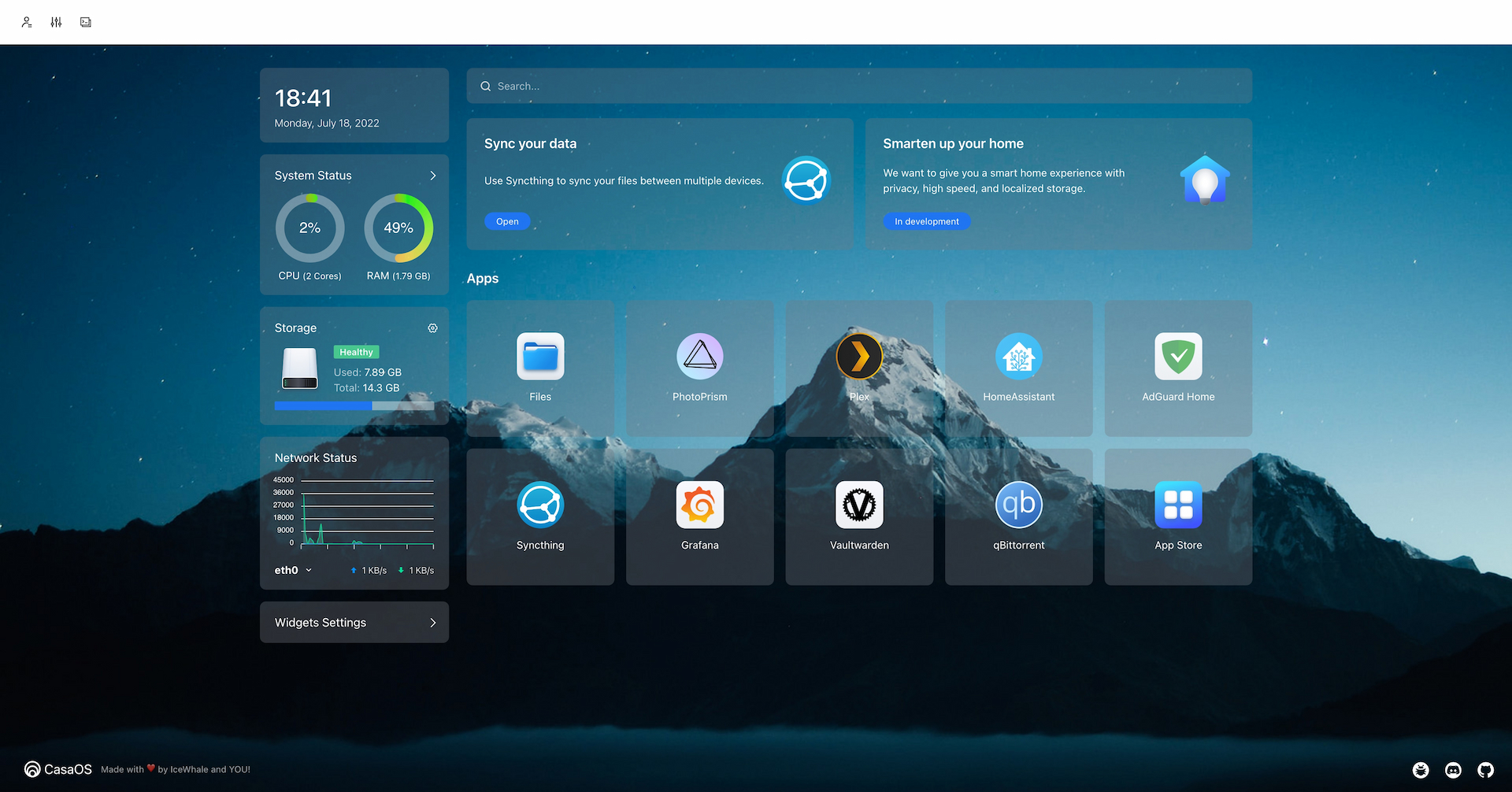
📸 Screenshots

Quick install
See the README for detailed install instructions. Most projects support Docker — if the repo has a Dockerfile, use:
git clone https://github.com/IceWhaleTech/CasaOS.git
cd CasaOS
docker build -t CasaOS .
docker run -d -p 8080:8080 CasaOS
Minimum system requirements
| Component | Recommended |
|---|---|
| RAM | 2048 MB |
| CPU | 2 vCPU |
| Disk | 25 GB SSD |
| OS | Ubuntu 22.04 LTS / Debian 12 |
| Docker | 24.0+ |
⚡ Deploy fast on VSIS
Use the VSIS VPS Lite 2GB RAM / 2 vCPU / 25GB SSD (~104k/tháng) plan from VSIS.NET — high-speed VN-based VPS, 24/7 support, ideal for running CasaOS smoothly.
🎯 Benefits:
- One-command
docker compose up -ddeploy in 2 minutes - Dedicated IPv4, root access, unmetered domestic bandwidth
- Daily snapshot backup
- Free install assistance from the VSIS team
👉 See matching VPS plans at vsis.net
Resources
- 🔗 GitHub: IceWhaleTech/CasaOS
- 🌐 Homepage: https://casaos.zimaspace.com
- 📚 Official docs: see README in the repo
- 💬 Community: GitHub Issues + Discussions
Article compiled from GitHub data on 05/05/2026. Star/fork counts may have changed — see live numbers via the GitHub link.